Connecting other email providers (IMAP/SMTP)
Connect any email using manual server settings
Updated December 2025
When to use IMAP/SMTP
Use this method if you're not using Gmail or Outlook, or if you prefer to connect via server settings. This works with any email provider that supports IMAP and SMTP - including custom domains, hosting providers, and business email services.
What you'll need
Before you start, gather these details from your email provider or hosting company:
- Email address
- Password (or app-specific password)
- Incoming mail server (IMAP)
- Outgoing mail server (SMTP)
💡 These settings are usually found in your email provider's help docs or hosting control panel. Search for "IMAP settings" + your provider name.
1Step 1: Add an account
From your Eskra dashboard, click "Add Account" and select "Other" from the provider options.
2Step 2: Enter your details
Fill in the connection form with your email settings:
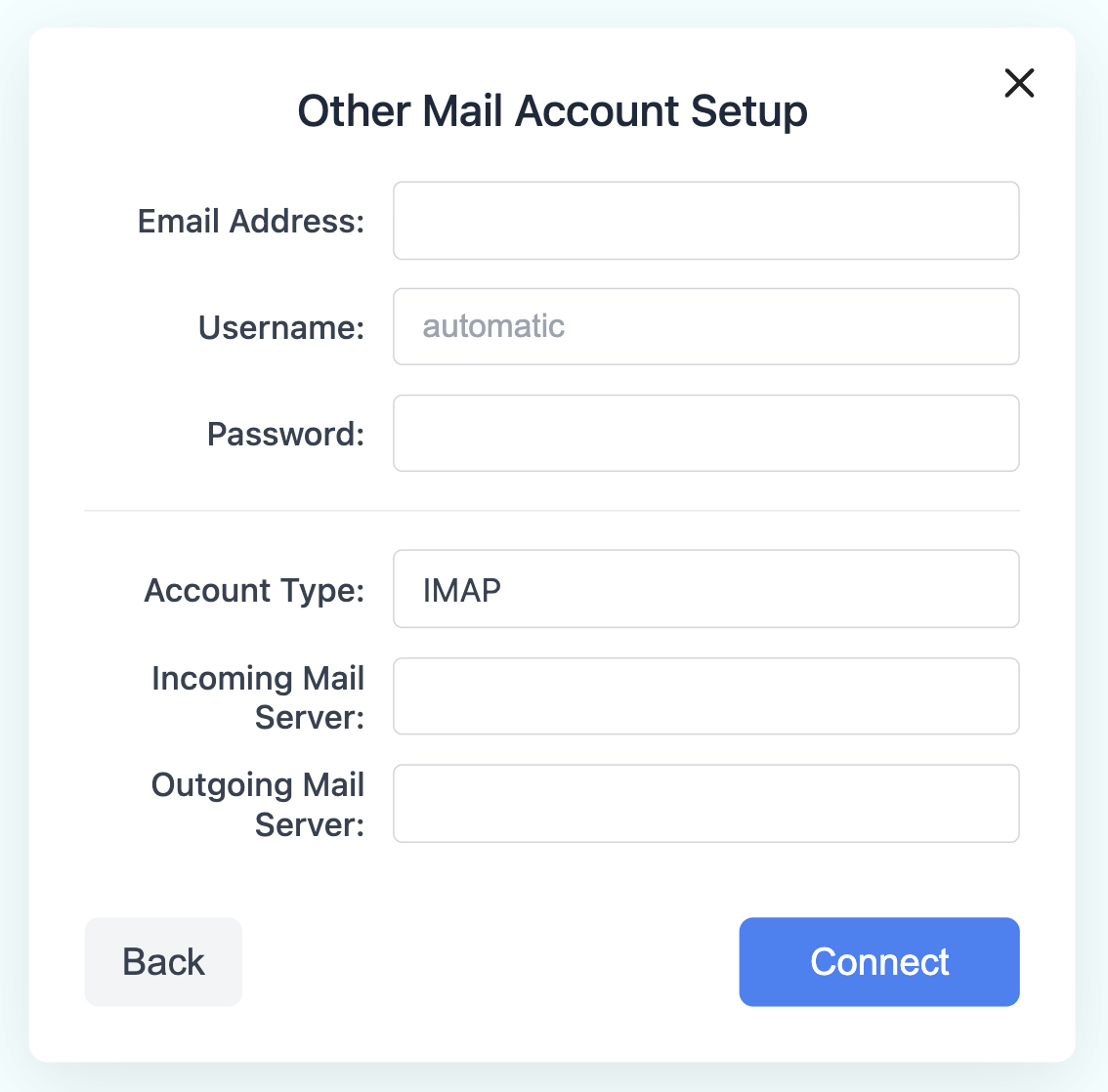
- Email Address Your full email address (e.g. [email protected])
- Username Usually your full email address. Leave as "automatic" if unsure.
- Password Your email password or app-specific password
- Account Type Select IMAP (recommended for syncing across devices)
- Incoming Mail Server Your IMAP server address (e.g. imap.yourdomain.com)
- Outgoing Mail Server Your SMTP server address (e.g. smtp.yourdomain.com)
3Step 3: Connect
Click "Connect" to test your settings. If successful, you'll be redirected to your dashboard with your new account ready to use.
Once connected, your account will appear in your dashboard and you can start using AI-powered replies!
Common server settings
Here are IMAP/SMTP settings for some popular providers:
| Provider | IMAP Server | SMTP Server |
|---|---|---|
| Yahoo Mail | imap.mail.yahoo.com |
smtp.mail.yahoo.com |
| iCloud | imap.mail.me.com |
smtp.mail.me.com |
| Zoho Mail | imap.zoho.com |
smtp.zoho.com |
| GoDaddy | imap.secureserver.net |
smtpout.secureserver.net |
| Hostinger | imap.hostinger.com |
smtp.hostinger.com |
Troubleshooting
- Connection failed? Double-check your server addresses and ports. Make sure IMAP is enabled in your email provider settings.
- Authentication error? Some providers require an app-specific password. Check your provider's security settings.
- Can't find your settings? Contact your email provider or hosting company for the correct IMAP/SMTP details.